# imports
from IPython.display import display, Markdown, HTML, SVG
import numpy as np
import matplotlib.pyplot as plt
import pandas as pd
from io import StringIO
# HTML functions ################################################################################## #

def f_truncate_df(df, head=5, tail=5):
    n = df.shape[0]

    # Handle rows
    if n > head + tail:
        top_rows = df.iloc[:head, :]
        bottom_rows = df.iloc[-tail:, :]
        middle_row = pd.DataFrame(
            [['...'] * df.shape[1]],
            index=['...'],
            columns=df.columns
        )
        df = pd.concat([top_rows, middle_row, bottom_rows])

    # Handle columns
    n_cols = df.shape[1]
    if n_cols > head + tail:
        left_cols = df.iloc[:, :head]
        right_cols = df.iloc[:, -tail:]
        middle_col = pd.DataFrame(
            [['...']] * df.shape[0],
            index=df.index,
            columns=['...']
        )
        df = pd.concat([left_cols, middle_col, right_cols], axis=1)

    return df

def f_create_flex_columns(html1, html2, padding=0, flex1=1, flex2=1):
    """
    Create a two-column HTML layout with specified content, padding, and flex values.

    Args:
    html1 (str): HTML content for the first column.
    html2 (str): HTML content for the second column.
    padding (int, optional): Padding for each column. Default is 0.
    flex1 (int, optional): Flex value for the first column. Default is 1.
    flex2 (int, optional): Flex value for the second column. Default is 1.

    Returns:
    str: A string representing the HTML layout with two columns.
    """
    return f'''
    <div style="display: flex;">
        <div style="flex: {flex1}; padding: {padding};">
            {html1}
        </div>
        <div style="flex: {flex2}; padding: {padding};">
            {html2}
        </div>
    </div>
    '''


def f_create_styled_div(content, text_color='black', background_color='white', padding=0,border='1px solid #999'):
    """
    Create a styled HTML div element with specified content, text color, background color, and padding.

    Args:
    content (str): The HTML content to be placed inside the div.
    text_color (str, optional): The color of the text inside the div. Default is 'black'.
    background_color (str, optional): The background color of the div. Default is 'white'.
    padding (int, optional): Padding for the div. Default is 0.

    Returns:
    str: A string representing the HTML div element with inline CSS.
    """
    style = f"flex: 1; padding: {padding}px; background-color: {background_color}; border: {border};"
    return f'<div style="{style} color: {text_color};">{content}</div>'


def f_list_to_html_bullets(lst):
    """
    Converts a list of items into an HTML unordered list with bullet points.

    Args:
        lst (list): A list of items to be converted into HTML bullet points.

    Returns:
        str: A string representing the HTML unordered list with the items as bullet points.
    """
    html_list = "<ul>\n"
    for item in lst:
        html_list += f"  <li>{item}</li>\n"
    html_list += "</ul>"
    return html_list


def f_wrap_in_span(text, color):
    """
    Wraps the given text in an HTML <span> tag with the specified text color.

    Args:
    text (str): The text to be wrapped in a span.
    color (str): The color to be applied to the text.

    Returns:
    str: The HTML string with the text wrapped in a <span> tag with the specified color.
    """
    return f'<span style="color: {color};">{text}</span>'
# Equations \ Formulae \ Notations ###############################################################################
not_number_of_observations = r"\(N\)"
not_observation_range = r"\(t \in \left\lbrace 1, 2, \ldots, N \right\rbrace \)"
not_observation_mapping = r"\(t' \in \left\lbrace 31/1/1970 , 28/2/1970, \ldots, 31/12/2024 \right\rbrace \)"
not_term_structure_vector = r"\(r\)"
not_spot_rv = r"\(R_i\)"
not_spot_dataset = r"\(r_i(t)\)"
not_log_diff_rv = r"\(S_i\)"
not_log_diff_dataset = r"\(s_i(t)\)"
not_demeaned_rv_whole_structure = r"\(S'\)"
not_demeaned_rv = r"\(S'_i\)"
not_demeaned_dataset = r"\(s'_i(t)\)"
not_demeaned_dataset_range= r"\((t-1,t)\)"
not_dimension_i_range = r"\(i \in \left\lbrace 1, 2, \ldots, m \right\rbrace \)"
not_dimension_j_range = r"\(j \in \left\lbrace 1, 1.5, 2, \ldots, 19.5, 20 \right\rbrace \)"
not_mean_log_diffs = r"\(\bar{{s}}(t)\)"
not_covariance_matrix = r"\(\Sigma\)"
not_eigenvalue = r"\(\lambda\)"
not_eigenvector = r"\(v\)"


eqn_sbar = r"\(\bar{{s}}(t)=\frac{{\sum_{{t=1}}^{{N}} s(t)}}{{N}}\)"
eqn_term_dimensions = r"i \in \{1, 2, \ldots, m\}"
eqn_term_structure_vector = r"\mathbf{r} = \left(\mathbf{r_1},\mathbf{r_2},...,\mathbf{r_m} \right)$"
eqn_log_differences = r"\( s_i(t)=\log{{ r_i(t)}}-\log {{ r_{{i-1}}(t)}} \)"
eqn_demean_dataset = r"\(s'_i(t)=s_i(t)-\bar{{s}}(t)\)"
eqn_covariance_matrix_extended = r"""\(
\Sigma = \text{Cov}(S') =
\begin{bmatrix}
\text{Var}(s'_1) & \text{Cov}(s'_1, s'_2) & \cdots & \text{Cov}(s'_1, s'_n) \\
\text{Cov}(s'_2, s'_1) & \text{Var}(s'_2) & \cdots & \text{Cov}(s'_2, s'_n) \\
\vdots & \vdots & \ddots & \vdots \\
\text{Cov}(s'_n, s'_1) & \text{Cov}(s'_n, s'_2) & \cdots & \text{Var}(s'_n)
\end{bmatrix}
\)"""
eqn_covariance_matrix_element = r"\(\text{Cov}(S'_{i_1}, S'_{i_2}) = \frac{1}{N-1} \sum_{t=1}^{N} (s'_{i_1}(t) - \bar{s'_{i_1}}) (s'_{i_2}(t) - \bar{s'_{i_2}}) \)"
eqn_covariance_matrix_compact = r"\(\Sigma_{{i_1},{i_2}} = \mathrm{Cov}(S'_{i_1}, S'_{i_2})\)"
eqn_variance_term_1 = r"\(\Sigma_{1,1} = \text{Var}(s'_1) = \frac{1}{N-1} \sum_{t=1}^{N} (s_1'(t) - \bar{s_1'}) (s_1'(t) - \bar{s_1'}) \)"
eqn_eigenvalues_and_vectors = r"\(\Sigma v = \lambda v\)"
eqn_eigenvalue = r"\(\mathbf{v} = \lambda \mathbf{v}\)"
eqn_eigenvalue2 = r"\(\det(A - \lambda I) = 0\)"
eqn_eigenvector = r"\((A - \lambda I)\mathbf{v} = \mathbf{0}\)"
# PARAMETERISATION ##################################################################

covariance_start_col = 2
covariance_columns = [float(x) for x in [       3,  3.5,    4,  4.5,    5,  5.5,    6,  6.5,
          7,  7.5,    8,  8.5,    9,  9.5,   10, 10.5,   11, 11.5,   12, 12.5,
         13, 13.5,   14, 14.5,   15, 15.5,   16, 16.5,   17, 17.5,   18, 18.5,
         19, 19.5,   20]]

#covariance_columns = [np.int64(1), np.int64(3), np.int64(5), np.int64(7), np.int64(20)]
####################    HTML SECTION ################################################
wrd_aim_intro = """
<p>
The aim is to extend principal component analysis of interest rates to use a Bayesian framework.  We aim to show how incorporating expert-informed priors can improve forecasts when changes in the economic environment are not yet reflected in historical data.
In particular, we consider how:
</p>
"""
list_aim_considerations =[
    "A classical model would have overestimated interest rates during the prolonged low-rate period following the 2008 financial crisis",
    "A Bayesian model could have adjusted expectations more appropriately",
    "Similar adjustments can be applied in response to global tariff policies imposed by the US administration"
]
#--------------------------------------------------------------------------------------------
list_determine_raw_calibration_dataset = [
"Truncate",
"Judgements on blanks and problem values",
]
list_transform_calibration_dataset = [
"logarithms",
"differencing",
"de-mean",
]
list_process_pca = [
"Choose dataset",
"Load into dataframe",
"Determine raw calibration dataset"+f_list_to_html_bullets(list_determine_raw_calibration_dataset),
"Transform into calibration dataset"+f_list_to_html_bullets(list_transform_calibration_dataset),
"Calculate Co-variance Matrix",
]
list_process_priors_from_prediction_errors =[
f_wrap_in_span("form of prior","red"),
]
list_process_future_priors =[
f_wrap_in_span("choice of data","red"),
]
wrd_process_titles_a = f_create_flex_columns("<h3>PCA no adjustments</h3>"+f_list_to_html_bullets(list_process_pca),"<h3>PCA in years following financial crisis</h3>")
wrd_process_titles_b = f_create_flex_columns("<h3>Determining Priors from prediction errors</h3>"+f_list_to_html_bullets(list_process_priors_from_prediction_errors),"<h3>Determining Future Looking Priors</h3>"+f_list_to_html_bullets(list_process_future_priors))
wrd_process_titles = f_create_flex_columns(wrd_process_titles_a , wrd_process_titles_b)
#-----------------------------------------------------------------------------------------------------------------------------
wrd_notation_intro = "We begin with an element-wise formulation to ground intuition..."
wrd_t_as_an_index = "<p>each " + not_observation_range+ "is an index representing each observation where each t maps onto a specific observation date " + not_observation_mapping + "</p>"
wrd_r_as_variable = "<p>" + not_spot_rv + " is a random variable for the spot rate for term i</p>"
wrd_r_as_dataset = "<p>" + not_spot_dataset + " is a dataset for the spot rate for term i over a series of observations " + not_observation_range + "</p>"
wrd_s_as_variable_whole_structure = "<p>" + not_demeaned_rv_whole_structure + " is a random variable for the de-meaned logged spot rate differences over whole term structure</p>"
wrd_s_as_variable = "<p>" + not_demeaned_rv + " is a random variable for the de-meaned logged spot rate differences for term i</p>"
wrd_number_observations = "<p>Number of observations is: "+not_number_of_observations+"</p>"
wrd_demeaned_dataset = "<p>"+not_log_diff_dataset+" is the dataset of observed log difference in interest rates over the period "+not_demeaned_dataset_range+"                  i.e.    "+"</p>"
wrd3 = eqn_demean_dataset
wrd_covarianc_elements = "<p>" + eqn_covariance_matrix_compact + " is an element within the covariance matrix " + not_covariance_matrix +"</p>"
list_definitions = [
wrd_number_observations,
wrd_t_as_an_index,
wrd_r_as_variable ,
wrd_r_as_dataset ,
wrd_s_as_variable_whole_structure,
wrd_s_as_variable,
wrd_demeaned_dataset,
wrd_covarianc_elements
        ]
#-----------------------------------------------------------------------------------------------------------------------------
# HTML #################################################################################################
display(HTML(f_create_flex_columns("<h1>Bayesian Principal Component Analysis</h1>","<a href='https://christopherpaine.github.io/bayesian-ifoa/'>link home</a>",0,9,1)))
display(HTML("<hr><h2>Aim</h2>"))
display(HTML(wrd_aim_intro+f_list_to_html_bullets(list_aim_considerations)))
display(HTML(f_create_flex_columns(" ",f_create_styled_div("why chosen spot rates over forward rates","darkred","white",0,"none"),0,7,1)))
display(HTML(f_create_flex_columns(" ",f_create_styled_div("no arbitrage considerations","darkred","white",0,"none"),0,7,1)))
display(HTML("<hr><h2>Process</h2>"))
display(HTML(wrd_process_titles))
display(HTML(f_create_flex_columns(" ",f_create_styled_div("supporting narative: the impace of quantitative easing (money supply) on interest rates.","darkred","white",0,"none"),0,7,1)))
display(HTML(f_create_flex_columns(" ",f_create_styled_div("supporting narative: the impact of wholesale funding activity on interest rates.","darkred","white",0,"none"),0,7,1)))
display(HTML("<hr><h2>Notation</h2>"+wrd_notation_intro))
display(HTML(f_list_to_html_bullets(list_definitions)))
display(HTML(f_create_flex_columns(" ",f_create_styled_div("use of random variable","darkred","white",0,"none"),0,7,1)))
display(HTML(f_create_flex_columns(" ",f_create_styled_div("ensure lowercase for observatinos (data)","darkred","white",0,"none"),0,7,1)))
display(HTML("<hr>"))
Bayesian Principal Component Analysis
Aim
The aim is to extend principal component analysis of interest rates to use a Bayesian framework. We aim to show how incorporating expert-informed priors can improve forecasts when changes in the economic environment are not yet reflected in historical data. In particular, we consider how:
- A classical model would have overestimated interest rates during the prolonged low-rate period following the 2008 financial crisis
- A Bayesian model could have adjusted expectations more appropriately
- Similar adjustments can be applied in response to global tariff policies imposed by the US administration
Process
PCA no adjustments
- Choose dataset
- Load into dataframe
- Determine raw calibration dataset
- Truncate
- Judgements on blanks and problem values
- Transform into calibration dataset
- logarithms
- differencing
- de-mean
- Calculate Co-variance Matrix
PCA in years following financial crisis
Determining Priors from prediction errors
- form of prior
Determining Future Looking Priors
- choice of data
Notation
We begin with an element-wise formulation to ground intuition...Number of observations is: \(N\)
each \(t \in \left\lbrace 1, 2, \ldots, N \right\rbrace \)is an index representing each observation where each t maps onto a specific observation date \(t' \in \left\lbrace 31/1/1970 , 28/2/1970, \ldots, 31/12/2024 \right\rbrace \)
\(R_i\) is a random variable for the spot rate for term i
\(r_i(t)\) is a dataset for the spot rate for term i over a series of observations \(t \in \left\lbrace 1, 2, \ldots, N \right\rbrace \)
\(S'\) is a random variable for the de-meaned logged spot rate differences over whole term structure
\(S'_i\) is a random variable for the de-meaned logged spot rate differences for term i
\(s_i(t)\) is the dataset of observed log difference in interest rates over the period \((t-1,t)\) i.e.
\(\Sigma_{{i_1},{i_2}} = \mathrm{Cov}(S'_{i_1}, S'_{i_2})\) is an element within the covariance matrix \(\Sigma\)
# load in first spreadsheet to df1
df1 = pd.read_excel("GLC Nominal month end data_1970 to 2015.xlsx",sheet_name="4. spot curve",engine="openpyxl",skiprows=5,header=None)
# create an appropriate set of headers
col_names=pd.read_excel("GLC Nominal month end data_1970 to 2015.xlsx",sheet_name="4. spot curve",engine="openpyxl",skiprows=3,nrows=1,header=None)
col_names[0]="Date"
df1.columns = col_names.iloc[0]
# load in second spreadsheet to df2
df2 = pd.read_excel("GLC Nominal month end data_2016 to present.xlsx",sheet_name="4. spot curve",engine="openpyxl",skiprows=5,header=None)
# create an appropriate set of headers
col_names2=pd.read_excel("GLC Nominal month end data_2016 to present.xlsx",sheet_name="4. spot curve",engine="openpyxl",skiprows=3,nrows=1,header=None)
col_names2[0]="Date"
df2.columns = col_names2.iloc[0]
#join the two dataframes to create df
df = pd.concat([df1, df2], ignore_index=True)
fred = "the first date is "+ str(df.iloc[0,0].strftime('%Y-%m-%d'))+" and the last is " +str(df.iloc[551,0].strftime('%Y-%m-%d') )
df2_dates = "the first dates is "+ str(df.iloc[552,0].strftime('%Y-%m-%d'))+" and the last is " +str(df.iloc[659,0].strftime('%Y-%m-%d') )
df1_length = str(len(df1))
df2_length = str(len(df2))
df1_sum = str(df1.iloc[:, 1:].sum().sum())
df2_sum = str(df2.iloc[:, 1:].sum().sum())
df_sum = str(df.iloc[:, 1:].sum().sum())
combined_total = 191503.172322029 + 17844.9993308767
df_length = str(len(df))
display(HTML(f"""
<div style="display: flex; padding: 5px;">
  <div style="flex: 1; padding: 5px;">            <h2>Creating One Combined DataFrame</h2>
            <p>We have 2 spreadsheets of spot yields from the Bank of England website that we will load into dataframes</p>
            <a href="./GLC Nominal month end data_1970 to 2015.xlsx" download>Download GLC Nominal month end data_1970 to 2015.xlsx</a><br>
            <a href="./GLC Nominal month end data_2016 to present.xlsx" download>Download GLC Nominal Month End Data (2016 to Present)</a>
</div>
  <div style="flex: 1; padding: 5px;">
             <h2>A v>
</div>
</div>


<h3>Basic Reasonableness Tests</h3>
<p>We perform a couple of reasonableness checks to ensure the spreadsheet data has loaded correctly into the combined dataframe</p>
<div style="display: flex; gap: 20px;">
  <div style="flex: 1;border: 1px solid #999;padding: 10px;">
    <h4><u>A Check on the Number of Rows</u></h4>
    <div style="display: flex; gap: 5px;">
      <div style="flex: 1;">
        <h5>Dataframe 1 - 1970 to 2015</h5>
        <p>{fred}<br>
        one would therefore expect 12 x 46yrs = 552 entries<br>
        and indeed we see the number of rows in df is {df1_length}</p>
      </div>
      <div style="flex: 1;">
        <h5>Dataframe 2 - 2015 to present</h5>
        <p>{df2_dates}<br>
        one would therefore expect 12 x 9yrs = 108 entries<br>
        and indeed we see the number of rows in df is {df2_length}</p>
     </div>
    </div>
    <h5>Combined DataFrame</h5>
<p>The length of combined dataframe is {df_length} rows"<br>
        whereas the two separate dataframes come to 552 + 108</p>
  </div>
  <div style="flex: 1;border: 1px solid #999;padding: 10px;">
    <h4><u>A Check on Sum of Values</u></h4>
    <div style="display: flex; gap: 5px;">
      <div style="flex: 1;">
    <h5>Dataframe 1 - 1970 to 2015</h5>
    <p>manual inspection of the sum of all values in first spreadsheet is 191503.172322029<br>the sum of 1st dataframe is also {df1_sum}</p>
      </div>
      <div style="flex: 1;">
    <h5>Dataframe 2 - 2015 to present</h5>
    <p>manual inspection of the sum of all values in second spreadsheet is 17844.9993308767<br>the sum of 1st dataframe is also {df2_sum}</p>
      </div>
      </div>
    <h5>Combined DataFrame</h5>
        <p>the sum of combined dataframe is {df_sum}<br>
and the sum of the manually observed 191503.172322029 + 17844.9993308767 = {combined_total}</p>
  </div>
</div>
<hr>
"""))
Creating One Combined DataFrame
We have 2 spreadsheets of spot yields from the Bank of England website that we will load into dataframes
Download GLC Nominal month end data_1970 to 2015.xlsxDownload GLC Nominal Month End Data (2016 to Present)
A v>
Basic Reasonableness Tests
We perform a couple of reasonableness checks to ensure the spreadsheet data has loaded correctly into the combined dataframe
A Check on the Number of Rows
Dataframe 1 - 1970 to 2015
the first date is 1970-01-31 and the last is 2015-12-31
one would therefore expect 12 x 46yrs = 552 entries
and indeed we see the number of rows in df is 552
Dataframe 2 - 2015 to present
the first dates is 2016-01-31 and the last is 2024-12-31
one would therefore expect 12 x 9yrs = 108 entries
and indeed we see the number of rows in df is 108
Combined DataFrame
The length of combined dataframe is 660 rows"
whereas the two separate dataframes come to 552 + 108
A Check on Sum of Values
Dataframe 1 - 1970 to 2015
manual inspection of the sum of all values in first spreadsheet is 191503.172322029
the sum of 1st dataframe is also 191503.17232202887
Dataframe 2 - 2015 to present
manual inspection of the sum of all values in second spreadsheet is 17844.9993308767
the sum of 1st dataframe is also 17844.999330876683
Combined DataFrame
the sum of combined dataframe is 209348.17165290558
and the sum of the manually observed 191503.172322029 + 17844.9993308767 = 209348.1716529057
%%capture
# bar chart
combined_df_isna_count = df.iloc[0:,1:].isna().sum().to_frame()
combined_df_isna_count_html = df.isna().sum().to_frame().to_html()


fig, ax = plt.subplots(1, 1);
combined_df_isna_count.plot(kind='bar', y=0, ax=ax);  # attach plot to your Figure
ax.set_title("Null Counts by Term");
ax.set_ylabel('No of Nulls');
ax.legend().remove();
xticks = ax.get_xticks();
ax.set_xticks(xticks[::5]);  # Keep every 5th tick

# Save figure to SVG string
buf = StringIO()
fig.savefig(buf, format='svg')
svg_str = buf.getvalue()
buf.close()
with open("plot.svg", "w") as f:
    f.write(svg_str)
%%capture
# first and last non null
# Get the index of the first non-null value for each column
# For each column in the DataFrame, find the index of the first non-null value, and return a Series mapping column names to those index labels.
first_non_null = df.apply(lambda col: col.first_valid_index())

# Get the index of the last non-null value for each column
last_non_null = df.apply(lambda col: col.last_valid_index())

# determine key values for the y-axis
# we want to create a series of key dates
unique_y = np.concatenate((first_non_null.unique(),last_non_null.unique()))
y_dates = df.iloc[unique_y,0]
y_dates = [dt.strftime('%Y-%m-%d') for dt in y_dates]


# DataFrame for line chart
lineg = pd.DataFrame(
    [first_non_null.values, last_non_null.values],
    columns=first_non_null.index  # or .keys()
)
x = lineg.columns[1:].astype(float).to_numpy()
y1 = lineg.iloc[0,1:].astype(float)
y2 = lineg.iloc[1,1:].astype(float)
fig2, ax2 = plt.subplots(1,1)
ax2.plot(x, y1,label='first non null')
ax2.plot(x, y2,label='last non null')
ax2.legend()
ax2.set_yticks(ticks=unique_y,labels=y_dates)
fig2.subplots_adjust(left=0.25)#so we can see the whole date label


# Save figure to SVG string
buf = StringIO()
fig2.savefig(buf, format='svg')
svg_str = buf.getvalue()
buf.close()
with open("plot2.svg", "w") as f:
    f.write(svg_str)


# Tabular presentation of data boundaries by term
step1 = pd.DataFrame(first_non_null[1:].index)
step1.columns = ['Terms']
f
first_non_null[1:]
dir(step1)
step2 =step1.copy()
step2['earliest-row-loc'] = first_non_null[1:].values
step3 = step2.copy()
step3["earliest-date"] = step3["earliest-row-loc"].apply(lambda x: df.iloc[x, 0])
step4 = step3.copy()
step4['last-row-loc'] = last_non_null[1:].values
step5 = step4.copy()
step5["last-date"] = step5["last-row-loc"].apply(lambda x: df.iloc[x, 0])
step6 = step5.copy()
step6["date_pair"] = list(zip(step5["earliest-date"], step5["last-date"]))
step6["group_id"] = (step6["date_pair"] != step6["date_pair"].shift()).cumsum()
step7 = (
    step6.groupby("group_id")
    .agg(
        start_term=("Terms", "min"),
        end_term=("Terms", "max"),
        earliest_date=("earliest-date", "first"),
        last_date=("last-date", "first"),
    )
    .reset_index(drop=True)
)
step8 = step7.to_html(index=False)


# Expected Data Points vs Actual Data Points
# ------------------------------------------
EvAstep1 = step7.copy()
EvAstep1['earliest_date'] = pd.to_datetime(EvAstep1['earliest_date'])
EvAstep1['last_date'] = pd.to_datetime(EvAstep1['last_date'])
EvAstep2 = EvAstep1.copy()
EvAstep2['num_months'] = ((EvAstep2['last_date'].dt.year - EvAstep2['earliest_date'].dt.year) * 12 +
                          (EvAstep2['last_date'].dt.month - EvAstep2['earliest_date'].dt.month) + 1)
EvAstep3 = pd.DataFrame(df.count())
EvAstep3 = EvAstep3.reset_index(names='date')
EvAstep3.columns = ['term', 'value']
EvAstep3 = EvAstep3.iloc[1:].reset_index(drop=True)
EvAstep3.columns = ['term', 'actual no. data-points']

def lookup_function(row,reference_df):
    matched_row = reference_df[(reference_df['start_term']<=row['term'])&(reference_df['end_term']>=row['term'])]
    return matched_row['num_months'].values[0] if not matched_row.empty else None

EvAstep4 = EvAstep3.copy()
EvAstep4['expected no. data-points'] = EvAstep4.apply(lambda row: lookup_function(row,EvAstep2), axis=1)
EvAstep4['missing data points']=EvAstep4.apply(lambda row: row.iloc[2]-row.iloc[1],axis=1)
EvAstep5 = EvAstep4.copy()
EvAstep5 = EvAstep5[EvAstep5.iloc[:,3]>0]
EvAstep6 = EvAstep5.to_html(index=False)

#truncation and interpolation of the dataset
#-------------------------------------------
date_col = df.iloc[:,0]
numeric_cols_interpolated = df.iloc[:,1:].interpolate()
df_interpolated = pd.concat([date_col,numeric_cols_interpolated],axis=1)
#truncation
df_truncated = df_interpolated.drop(df_interpolated.columns[41:],axis=1)
df_truncated = df_truncated.drop(df_truncated.columns[1],axis=1)


# Some notes on variables we have set
# -----------------------------------
# first_non_null and last_non_null are each panda series and each return a row index
# unique_y is a numpy array that gives us unique row indexes at which first or last observations occur
# y_dates is a list that gives us unique dates at which first or last observations occur
# y1 and y2 are row indexes for all terms of first and last observations respectively
display(HTML(f"""
<h2>Truncation & Interpolation of the Dataset</h2>

<div style="display: flex; padding: 5px;">
  <div style="flex: 1;">
    <!-- Left column content -->
    <p>Principal component analysis requires same number of datapoints for each term so as to produce a rectangular matrix from which covariances can be calculated.</p>
    <p>The dataset of spot yields contains gaps insofar that the whole set of observation dates is not consistently available for all terms.  We want to choose a range of observation dates and terms that reduces the need to fill in gaps in the dataset.</p>
    <p>We have spot yield data for terms 0.5 up to 40.  The first step to identify a calibration dataset is to identify the first and last data point for each term.  This gives us an initial idea of the size of the dataset available.</p>
    <p>We make a judgement call about which terms to retain (and observation dates) to retain.  If there are gaps in the data we use linear interpolation to fill them.</p>
</div>
  <div style="flex: 1; background-color: #ddd;border: 1px solid #999;padding: 10px;">
    <!-- Right column content -->


<h3>Matplotlib figures, subplots, axes</h3>
<ul>
    <li>Figure	The whole canvas or image </li>
    <li>Axes	One chart (with x/y axes, labels, data) </li>
    <li>Subplot	One chart within a grid layout (i.e., an Axes) </li>
    <li>Grid of subplots	Arrangement of multiple Axes in a Figure</li>
</ul>
  </div>
</div>


<div style="display: flex; padding: 5px;">
  <div style="flex: 1;">
    <h3>Data Boundaries by Term</h3>
             <u> <h5>visual</h5> </u>
             <p>The maiximum range of observation dates for each term is found by the earliest and latest non NaN entry.  We see that for beyond term 25 data is only available from  31st January 2016 and that for earlier terms available from 31st January 1970 (with an exception for term 0.5).</p>
    <img src="plot2.svg" alt="My chart">
    <u> <h5>tabular</h5> </u>
    {step8}
    <h3>Interpolation</h3>
    <p>Summary statistics on interpolated/truncated dataset</p>
    <ul>
        <li>term</li>
        <li>actual data points</li>
    </ul>
    <p>Rows untouched by interpolation should have same total as before.  totals for those with interpolation should could be checked for reasonableness. </p>
    <h3>Decisions</h3>
    <ul>
        <li>Data for terms greater than 25 isn't available before 2016.  We will therefore not model beyond term 25 in order to facilitate sufficient history of data-points. </li>
        <li>we ignore term 0.5 and start at term 1 due to missing datapoints for term 0.5</li>
        <li>we ignore terms beyond 20 since the proportion of missing datapoints is too great.</li>
        <li>we replace -ve values with NaN and then interpolate</li>
    </ul>

   </div>
  <div style="flex: 1;">
    <h3>Null Counts</h3>
    <h4>Histogram</h4>
    <p>An initial inspection of the data shows signficantly more nulls for greater terms.  Beyond term 25 we see the number levels off and we later discover this is because data for term 25 onwards doesn't begin until 2016 meaning there is a significant block of NaN values from 1970 to 2016 for these terms.</p>
    <img src="plot.svg" alt="My chart">
    <h4>Tabulated</h4>
        <p>We identify non contiguous blocks of data by determining the expected number of data points, based on first and last data point, and comparing with actual number of data points. </p>
        <p>These are the columns which will be interpolated.</p>
    {EvAstep6}
  </div>
</div

"""             ))
Truncation & Interpolation of the Dataset
Principal component analysis requires same number of datapoints for each term so as to produce a rectangular matrix from which covariances can be calculated.
The dataset of spot yields contains gaps insofar that the whole set of observation dates is not consistently available for all terms. We want to choose a range of observation dates and terms that reduces the need to fill in gaps in the dataset.
We have spot yield data for terms 0.5 up to 40. The first step to identify a calibration dataset is to identify the first and last data point for each term. This gives us an initial idea of the size of the dataset available.
We make a judgement call about which terms to retain (and observation dates) to retain. If there are gaps in the data we use linear interpolation to fill them.
Matplotlib figures, subplots, axes
- Figure The whole canvas or image
- Axes One chart (with x/y axes, labels, data)
- Subplot One chart within a grid layout (i.e., an Axes)
- Grid of subplots Arrangement of multiple Axes in a Figure
Data Boundaries by Term
visual
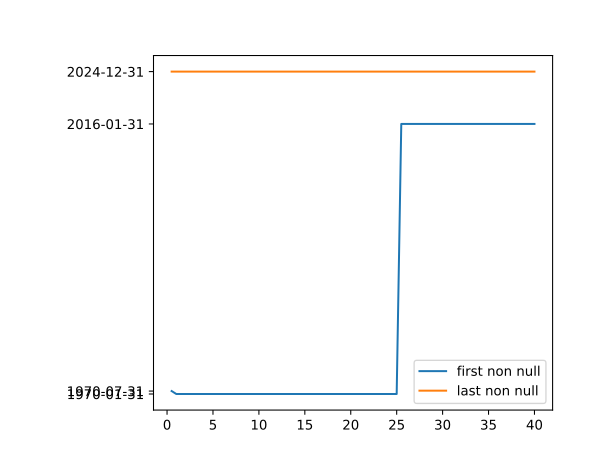
The maiximum range of observation dates for each term is found by the earliest and latest non NaN entry. We see that for beyond term 25 data is only available from 31st January 2016 and that for earlier terms available from 31st January 1970 (with an exception for term 0.5).
tabular
| start_term | end_term | earliest_date | last_date |
|---|---|---|---|
| 0.5 | 0.5 | 1970-07-31 | 2024-12-31 |
| 1.0 | 25.0 | 1970-01-31 | 2024-12-31 |
| 25.5 | 40.0 | 2016-01-31 | 2024-12-31 |
Interpolation
Summary statistics on interpolated/truncated dataset
- term
- actual data points
Rows untouched by interpolation should have same total as before. totals for those with interpolation should could be checked for reasonableness.
Decisions
- Data for terms greater than 25 isn't available before 2016. We will therefore not model beyond term 25 in order to facilitate sufficient history of data-points.
- we ignore term 0.5 and start at term 1 due to missing datapoints for term 0.5
- we ignore terms beyond 20 since the proportion of missing datapoints is too great.
- we replace -ve values with NaN and then interpolate
Null Counts
Histogram
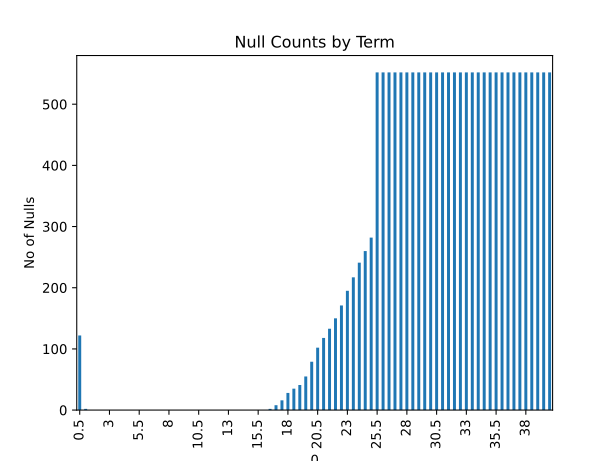
An initial inspection of the data shows signficantly more nulls for greater terms. Beyond term 25 we see the number levels off and we later discover this is because data for term 25 onwards doesn't begin until 2016 meaning there is a significant block of NaN values from 1970 to 2016 for these terms.
Tabulated
We identify non contiguous blocks of data by determining the expected number of data points, based on first and last data point, and comparing with actual number of data points.
These are the columns which will be interpolated.
| term | actual no. data-points | expected no. data-points | missing data points |
|---|---|---|---|
| 0.5 | 538 | 654 | 116 |
| 1 | 658 | 660 | 2 |
| 16.5 | 658 | 660 | 2 |
| 17 | 652 | 660 | 8 |
| 17.5 | 644 | 660 | 16 |
| 18 | 632 | 660 | 28 |
| 18.5 | 625 | 660 | 35 |
| 19 | 619 | 660 | 41 |
| 19.5 | 605 | 660 | 55 |
| 20 | 581 | 660 | 79 |
| 20.5 | 558 | 660 | 102 |
| 21 | 542 | 660 | 118 |
| 21.5 | 527 | 660 | 133 |
| 22 | 510 | 660 | 150 |
| 22.5 | 489 | 660 | 171 |
| 23 | 465 | 660 | 195 |
| 23.5 | 443 | 660 | 217 |
| 24 | 419 | 660 | 241 |
| 24.5 | 400 | 660 | 260 |
| 25 | 378 | 660 | 282 |
identifying_negatives = df_truncated.iloc[:,1:][(df_truncated.iloc[:,1:]<0).any(axis=1)]
df_truncated_no_negs = df_truncated.iloc[:,1:].where(df_truncated.iloc[:,1:]>=0,np.nan)
df_truncated_no_negs_interpolated = df_truncated_no_negs.interpolate()
display(HTML(rf"""
<hr>
<h2>Removing Negatives </h2>
             <p>
             Logarithms are only defined for positive arguments.  We therefore need to consider the small number of -ve values observable in the dataset:
             </p>
             {identifying_negatives.to_html()}
             For ease of analysis we set these values to NaN.
             {df_truncated_no_negs.loc[identifying_negatives.index].to_html()}
             We now populate this values with interpolated values moving down the columns (terms)
             {df_truncated_no_negs_interpolated.loc[identifying_negatives.index].to_html()}
<span style='color:red;font-size:10px;'>checks we can perform on the interpolated values .....</span>
            <hr>
"""             ))
Removing Negatives
Logarithms are only defined for positive arguments. We therefore need to consider the small number of -ve values observable in the dataset:
| 1 | 1.5 | 2 | 2.5 | 3 | 3.5 | 4 | 4.5 | 5 | 5.5 | 6 | 6.5 | 7 | 7.5 | 8 | 8.5 | 9 | 9.5 | 10 | 10.5 | 11 | 11.5 | 12 | 12.5 | 13 | 13.5 | 14 | 14.5 | 15 | 15.5 | 16 | 16.5 | 17 | 17.5 | 18 | 18.5 | 19 | 19.5 | 20 | |
|---|---|---|---|---|---|---|---|---|---|---|---|---|---|---|---|---|---|---|---|---|---|---|---|---|---|---|---|---|---|---|---|---|---|---|---|---|---|---|---|
| 563 | -0.029262 | -0.001047 | 0.043756 | 0.109305 | 0.189006 | 0.276475 | 0.367344 | 0.458905 | 0.549509 | 0.638135 | 0.724153 | 0.807198 | 0.887065 | 0.963633 | 1.036835 | 1.106630 | 1.173004 | 1.235965 | 1.295547 | 1.351811 | 1.404839 | 1.454735 | 1.501617 | 1.545612 | 1.586846 | 1.625441 | 1.661513 | 1.695176 | 1.726532 | 1.755679 | 1.782703 | 1.807684 | 1.830696 | 1.851804 | 1.871069 | 1.888547 | 1.904289 | 1.918343 | 1.930750 |
| 604 | 0.013280 | -0.008485 | -0.026463 | -0.038360 | -0.045366 | -0.048285 | -0.047483 | -0.043166 | -0.035471 | -0.024514 | -0.010422 | 0.006623 | 0.026389 | 0.048598 | 0.072939 | 0.099068 | 0.126623 | 0.155230 | 0.184513 | 0.214115 | 0.243703 | 0.272976 | 0.301683 | 0.329611 | 0.356588 | 0.382482 | 0.407196 | 0.430662 | 0.452836 | 0.473698 | 0.493245 | 0.511489 | 0.528452 | 0.544158 | 0.558634 | 0.571912 | 0.584025 | 0.595003 | 0.604871 |
| 605 | -0.009801 | -0.045821 | -0.069679 | -0.082474 | -0.087813 | -0.087702 | -0.083129 | -0.074636 | -0.062575 | -0.047221 | -0.028843 | -0.007721 | 0.015849 | 0.041565 | 0.069117 | 0.098202 | 0.128522 | 0.159784 | 0.191701 | 0.223987 | 0.256358 | 0.288540 | 0.320278 | 0.351335 | 0.381499 | 0.410597 | 0.438483 | 0.465038 | 0.490166 | 0.513801 | 0.535908 | 0.556471 | 0.575490 | 0.592980 | 0.608966 | 0.623480 | 0.636566 | 0.648269 | 0.658634 |
| 606 | -0.021850 | -0.060837 | -0.093727 | -0.117590 | -0.132942 | -0.140738 | -0.141903 | -0.137297 | -0.127686 | -0.113755 | -0.096113 | -0.075301 | -0.051791 | -0.026006 | 0.001680 | 0.030934 | 0.061458 | 0.092975 | 0.125219 | 0.157930 | 0.190848 | 0.223717 | 0.256297 | 0.288360 | 0.319703 | 0.350154 | 0.379560 | 0.407790 | 0.434736 | 0.460316 | 0.484474 | 0.507173 | 0.528394 | 0.548129 | 0.566381 | 0.583166 | 0.598503 | 0.612420 | 0.624943 |
| 607 | -0.044205 | -0.060842 | -0.072683 | -0.077088 | -0.074019 | -0.064180 | -0.048489 | -0.027846 | -0.003051 | 0.025198 | 0.056286 | 0.089672 | 0.124869 | 0.161443 | 0.199012 | 0.237246 | 0.275859 | 0.314604 | 0.353255 | 0.391597 | 0.429425 | 0.466545 | 0.502782 | 0.537975 | 0.571987 | 0.604711 | 0.636056 | 0.665950 | 0.694343 | 0.721202 | 0.746517 | 0.770289 | 0.792526 | 0.813245 | 0.832466 | 0.850214 | 0.866519 | 0.881407 | 0.894903 |
| 608 | -0.013335 | -0.031917 | -0.053845 | -0.071520 | -0.082226 | -0.085494 | -0.081745 | -0.071701 | -0.056157 | -0.035908 | -0.011696 | 0.015798 | 0.045965 | 0.078254 | 0.112178 | 0.147299 | 0.183232 | 0.219629 | 0.256177 | 0.292589 | 0.328609 | 0.364007 | 0.398583 | 0.432165 | 0.464610 | 0.495807 | 0.525665 | 0.554117 | 0.581113 | 0.606625 | 0.630642 | 0.653169 | 0.674213 | 0.693791 | 0.711921 | 0.728628 | 0.743936 | 0.757870 | 0.770452 |
| 609 | -0.026419 | -0.038957 | -0.053194 | -0.063327 | -0.067327 | -0.064971 | -0.056681 | -0.043049 | -0.024727 | -0.002351 | 0.023489 | 0.052251 | 0.083436 | 0.116576 | 0.151235 | 0.187014 | 0.223545 | 0.260494 | 0.297556 | 0.334453 | 0.370930 | 0.406762 | 0.441750 | 0.475723 | 0.508542 | 0.540096 | 0.570296 | 0.599073 | 0.626380 | 0.652191 | 0.676501 | 0.699315 | 0.720645 | 0.740513 | 0.758942 | 0.775962 | 0.791605 | 0.805897 | 0.818866 |
| 610 | -0.021041 | -0.018181 | -0.020028 | -0.020669 | -0.017662 | -0.010179 | 0.001872 | 0.018243 | 0.038508 | 0.062170 | 0.088734 | 0.117723 | 0.148696 | 0.181239 | 0.214973 | 0.249557 | 0.284683 | 0.320072 | 0.355470 | 0.390640 | 0.425362 | 0.459443 | 0.492706 | 0.525004 | 0.556215 | 0.586239 | 0.614997 | 0.642423 | 0.668475 | 0.693129 | 0.716376 | 0.738220 | 0.758670 | 0.777739 | 0.795446 | 0.811814 | 0.826865 | 0.840619 | 0.853095 |
| 611 | -0.150365 | -0.143101 | -0.135252 | -0.128029 | -0.120277 | -0.110666 | -0.098319 | -0.082835 | -0.064186 | -0.042572 | -0.018300 | 0.008284 | 0.036825 | 0.066975 | 0.098400 | 0.130781 | 0.163819 | 0.197237 | 0.230777 | 0.264203 | 0.297302 | 0.329889 | 0.361801 | 0.392904 | 0.423088 | 0.452263 | 0.480356 | 0.507309 | 0.533080 | 0.557645 | 0.580993 | 0.603122 | 0.624032 | 0.643726 | 0.662211 | 0.679494 | 0.695579 | 0.710465 | 0.724151 |
| 612 | -0.113058 | -0.102450 | -0.095639 | -0.087447 | -0.075699 | -0.059686 | -0.039392 | -0.015160 | 0.012502 | 0.043034 | 0.075896 | 0.110587 | 0.146651 | 0.183678 | 0.221307 | 0.259217 | 0.297133 | 0.334812 | 0.372041 | 0.408633 | 0.444425 | 0.479279 | 0.513077 | 0.545726 | 0.577154 | 0.607305 | 0.636140 | 0.663630 | 0.689764 | 0.714540 | 0.737972 | 0.760073 | 0.780862 | 0.800356 | 0.818575 | 0.835541 | 0.851268 | 0.865767 | 0.879051 |
| 1 | 1.5 | 2 | 2.5 | 3 | 3.5 | 4 | 4.5 | 5 | 5.5 | 6 | 6.5 | 7 | 7.5 | 8 | 8.5 | 9 | 9.5 | 10 | 10.5 | 11 | 11.5 | 12 | 12.5 | 13 | 13.5 | 14 | 14.5 | 15 | 15.5 | 16 | 16.5 | 17 | 17.5 | 18 | 18.5 | 19 | 19.5 | 20 | |
|---|---|---|---|---|---|---|---|---|---|---|---|---|---|---|---|---|---|---|---|---|---|---|---|---|---|---|---|---|---|---|---|---|---|---|---|---|---|---|---|
| 563 | NaN | NaN | 0.043756 | 0.109305 | 0.189006 | 0.276475 | 0.367344 | 0.458905 | 0.549509 | 0.638135 | 0.724153 | 0.807198 | 0.887065 | 0.963633 | 1.036835 | 1.106630 | 1.173004 | 1.235965 | 1.295547 | 1.351811 | 1.404839 | 1.454735 | 1.501617 | 1.545612 | 1.586846 | 1.625441 | 1.661513 | 1.695176 | 1.726532 | 1.755679 | 1.782703 | 1.807684 | 1.830696 | 1.851804 | 1.871069 | 1.888547 | 1.904289 | 1.918343 | 1.930750 |
| 604 | 0.01328 | NaN | NaN | NaN | NaN | NaN | NaN | NaN | NaN | NaN | NaN | 0.006623 | 0.026389 | 0.048598 | 0.072939 | 0.099068 | 0.126623 | 0.155230 | 0.184513 | 0.214115 | 0.243703 | 0.272976 | 0.301683 | 0.329611 | 0.356588 | 0.382482 | 0.407196 | 0.430662 | 0.452836 | 0.473698 | 0.493245 | 0.511489 | 0.528452 | 0.544158 | 0.558634 | 0.571912 | 0.584025 | 0.595003 | 0.604871 |
| 605 | NaN | NaN | NaN | NaN | NaN | NaN | NaN | NaN | NaN | NaN | NaN | NaN | 0.015849 | 0.041565 | 0.069117 | 0.098202 | 0.128522 | 0.159784 | 0.191701 | 0.223987 | 0.256358 | 0.288540 | 0.320278 | 0.351335 | 0.381499 | 0.410597 | 0.438483 | 0.465038 | 0.490166 | 0.513801 | 0.535908 | 0.556471 | 0.575490 | 0.592980 | 0.608966 | 0.623480 | 0.636566 | 0.648269 | 0.658634 |
| 606 | NaN | NaN | NaN | NaN | NaN | NaN | NaN | NaN | NaN | NaN | NaN | NaN | NaN | NaN | 0.001680 | 0.030934 | 0.061458 | 0.092975 | 0.125219 | 0.157930 | 0.190848 | 0.223717 | 0.256297 | 0.288360 | 0.319703 | 0.350154 | 0.379560 | 0.407790 | 0.434736 | 0.460316 | 0.484474 | 0.507173 | 0.528394 | 0.548129 | 0.566381 | 0.583166 | 0.598503 | 0.612420 | 0.624943 |
| 607 | NaN | NaN | NaN | NaN | NaN | NaN | NaN | NaN | NaN | 0.025198 | 0.056286 | 0.089672 | 0.124869 | 0.161443 | 0.199012 | 0.237246 | 0.275859 | 0.314604 | 0.353255 | 0.391597 | 0.429425 | 0.466545 | 0.502782 | 0.537975 | 0.571987 | 0.604711 | 0.636056 | 0.665950 | 0.694343 | 0.721202 | 0.746517 | 0.770289 | 0.792526 | 0.813245 | 0.832466 | 0.850214 | 0.866519 | 0.881407 | 0.894903 |
| 608 | NaN | NaN | NaN | NaN | NaN | NaN | NaN | NaN | NaN | NaN | NaN | 0.015798 | 0.045965 | 0.078254 | 0.112178 | 0.147299 | 0.183232 | 0.219629 | 0.256177 | 0.292589 | 0.328609 | 0.364007 | 0.398583 | 0.432165 | 0.464610 | 0.495807 | 0.525665 | 0.554117 | 0.581113 | 0.606625 | 0.630642 | 0.653169 | 0.674213 | 0.693791 | 0.711921 | 0.728628 | 0.743936 | 0.757870 | 0.770452 |
| 609 | NaN | NaN | NaN | NaN | NaN | NaN | NaN | NaN | NaN | NaN | 0.023489 | 0.052251 | 0.083436 | 0.116576 | 0.151235 | 0.187014 | 0.223545 | 0.260494 | 0.297556 | 0.334453 | 0.370930 | 0.406762 | 0.441750 | 0.475723 | 0.508542 | 0.540096 | 0.570296 | 0.599073 | 0.626380 | 0.652191 | 0.676501 | 0.699315 | 0.720645 | 0.740513 | 0.758942 | 0.775962 | 0.791605 | 0.805897 | 0.818866 |
| 610 | NaN | NaN | NaN | NaN | NaN | NaN | 0.001872 | 0.018243 | 0.038508 | 0.062170 | 0.088734 | 0.117723 | 0.148696 | 0.181239 | 0.214973 | 0.249557 | 0.284683 | 0.320072 | 0.355470 | 0.390640 | 0.425362 | 0.459443 | 0.492706 | 0.525004 | 0.556215 | 0.586239 | 0.614997 | 0.642423 | 0.668475 | 0.693129 | 0.716376 | 0.738220 | 0.758670 | 0.777739 | 0.795446 | 0.811814 | 0.826865 | 0.840619 | 0.853095 |
| 611 | NaN | NaN | NaN | NaN | NaN | NaN | NaN | NaN | NaN | NaN | NaN | 0.008284 | 0.036825 | 0.066975 | 0.098400 | 0.130781 | 0.163819 | 0.197237 | 0.230777 | 0.264203 | 0.297302 | 0.329889 | 0.361801 | 0.392904 | 0.423088 | 0.452263 | 0.480356 | 0.507309 | 0.533080 | 0.557645 | 0.580993 | 0.603122 | 0.624032 | 0.643726 | 0.662211 | 0.679494 | 0.695579 | 0.710465 | 0.724151 |
| 612 | NaN | NaN | NaN | NaN | NaN | NaN | NaN | NaN | 0.012502 | 0.043034 | 0.075896 | 0.110587 | 0.146651 | 0.183678 | 0.221307 | 0.259217 | 0.297133 | 0.334812 | 0.372041 | 0.408633 | 0.444425 | 0.479279 | 0.513077 | 0.545726 | 0.577154 | 0.607305 | 0.636140 | 0.663630 | 0.689764 | 0.714540 | 0.737972 | 0.760073 | 0.780862 | 0.800356 | 0.818575 | 0.835541 | 0.851268 | 0.865767 | 0.879051 |
| 1 | 1.5 | 2 | 2.5 | 3 | 3.5 | 4 | 4.5 | 5 | 5.5 | 6 | 6.5 | 7 | 7.5 | 8 | 8.5 | 9 | 9.5 | 10 | 10.5 | 11 | 11.5 | 12 | 12.5 | 13 | 13.5 | 14 | 14.5 | 15 | 15.5 | 16 | 16.5 | 17 | 17.5 | 18 | 18.5 | 19 | 19.5 | 20 | |
|---|---|---|---|---|---|---|---|---|---|---|---|---|---|---|---|---|---|---|---|---|---|---|---|---|---|---|---|---|---|---|---|---|---|---|---|---|---|---|---|
| 563 | 0.050886 | 0.090516 | 0.043756 | 0.109305 | 0.189006 | 0.276475 | 0.367344 | 0.458905 | 0.549509 | 0.638135 | 0.724153 | 0.807198 | 0.887065 | 0.963633 | 1.036835 | 1.106630 | 1.173004 | 1.235965 | 1.295547 | 1.351811 | 1.404839 | 1.454735 | 1.501617 | 1.545612 | 1.586846 | 1.625441 | 1.661513 | 1.695176 | 1.726532 | 1.755679 | 1.782703 | 1.807684 | 1.830696 | 1.851804 | 1.871069 | 1.888547 | 1.904289 | 1.918343 | 1.930750 |
| 604 | 0.013280 | 0.041635 | 0.040681 | 0.044429 | 0.051206 | 0.059899 | 0.039947 | 0.048182 | 0.058168 | 0.059801 | 0.076369 | 0.006623 | 0.026389 | 0.048598 | 0.072939 | 0.099068 | 0.126623 | 0.155230 | 0.184513 | 0.214115 | 0.243703 | 0.272976 | 0.301683 | 0.329611 | 0.356588 | 0.382482 | 0.407196 | 0.430662 | 0.452836 | 0.473698 | 0.493245 | 0.511489 | 0.528452 | 0.544158 | 0.558634 | 0.571912 | 0.584025 | 0.595003 | 0.604871 |
| 605 | 0.012128 | 0.042606 | 0.046637 | 0.054873 | 0.066015 | 0.079125 | 0.033601 | 0.043192 | 0.054891 | 0.048267 | 0.069675 | 0.034306 | 0.015849 | 0.041565 | 0.069117 | 0.098202 | 0.128522 | 0.159784 | 0.191701 | 0.223987 | 0.256358 | 0.288540 | 0.320278 | 0.351335 | 0.381499 | 0.410597 | 0.438483 | 0.465038 | 0.490166 | 0.513801 | 0.535908 | 0.556471 | 0.575490 | 0.592980 | 0.608966 | 0.623480 | 0.636566 | 0.648269 | 0.658634 |
| 606 | 0.010976 | 0.043578 | 0.052592 | 0.065317 | 0.080824 | 0.098351 | 0.027255 | 0.038202 | 0.051615 | 0.036732 | 0.062981 | 0.061989 | 0.070359 | 0.101504 | 0.001680 | 0.030934 | 0.061458 | 0.092975 | 0.125219 | 0.157930 | 0.190848 | 0.223717 | 0.256297 | 0.288360 | 0.319703 | 0.350154 | 0.379560 | 0.407790 | 0.434736 | 0.460316 | 0.484474 | 0.507173 | 0.528394 | 0.548129 | 0.566381 | 0.583166 | 0.598503 | 0.612420 | 0.624943 |
| 607 | 0.009824 | 0.044549 | 0.058548 | 0.075760 | 0.095634 | 0.117576 | 0.020909 | 0.033212 | 0.048338 | 0.025198 | 0.056286 | 0.089672 | 0.124869 | 0.161443 | 0.199012 | 0.237246 | 0.275859 | 0.314604 | 0.353255 | 0.391597 | 0.429425 | 0.466545 | 0.502782 | 0.537975 | 0.571987 | 0.604711 | 0.636056 | 0.665950 | 0.694343 | 0.721202 | 0.746517 | 0.770289 | 0.792526 | 0.813245 | 0.832466 | 0.850214 | 0.866519 | 0.881407 | 0.894903 |
| 608 | 0.008672 | 0.045521 | 0.064504 | 0.086204 | 0.110443 | 0.136802 | 0.014564 | 0.028222 | 0.045061 | 0.037522 | 0.039888 | 0.015798 | 0.045965 | 0.078254 | 0.112178 | 0.147299 | 0.183232 | 0.219629 | 0.256177 | 0.292589 | 0.328609 | 0.364007 | 0.398583 | 0.432165 | 0.464610 | 0.495807 | 0.525665 | 0.554117 | 0.581113 | 0.606625 | 0.630642 | 0.653169 | 0.674213 | 0.693791 | 0.711921 | 0.728628 | 0.743936 | 0.757870 | 0.770452 |
| 609 | 0.007521 | 0.046493 | 0.070459 | 0.096648 | 0.125253 | 0.156028 | 0.008218 | 0.023233 | 0.041784 | 0.049846 | 0.023489 | 0.052251 | 0.083436 | 0.116576 | 0.151235 | 0.187014 | 0.223545 | 0.260494 | 0.297556 | 0.334453 | 0.370930 | 0.406762 | 0.441750 | 0.475723 | 0.508542 | 0.540096 | 0.570296 | 0.599073 | 0.626380 | 0.652191 | 0.676501 | 0.699315 | 0.720645 | 0.740513 | 0.758942 | 0.775962 | 0.791605 | 0.805897 | 0.818866 |
| 610 | 0.006369 | 0.047464 | 0.076415 | 0.107092 | 0.140062 | 0.175253 | 0.001872 | 0.018243 | 0.038508 | 0.062170 | 0.088734 | 0.117723 | 0.148696 | 0.181239 | 0.214973 | 0.249557 | 0.284683 | 0.320072 | 0.355470 | 0.390640 | 0.425362 | 0.459443 | 0.492706 | 0.525004 | 0.556215 | 0.586239 | 0.614997 | 0.642423 | 0.668475 | 0.693129 | 0.716376 | 0.738220 | 0.758670 | 0.777739 | 0.795446 | 0.811814 | 0.826865 | 0.840619 | 0.853095 |
| 611 | 0.005217 | 0.048436 | 0.082371 | 0.117535 | 0.154871 | 0.194479 | 0.095777 | 0.124159 | 0.025505 | 0.052602 | 0.082315 | 0.008284 | 0.036825 | 0.066975 | 0.098400 | 0.130781 | 0.163819 | 0.197237 | 0.230777 | 0.264203 | 0.297302 | 0.329889 | 0.361801 | 0.392904 | 0.423088 | 0.452263 | 0.480356 | 0.507309 | 0.533080 | 0.557645 | 0.580993 | 0.603122 | 0.624032 | 0.643726 | 0.662211 | 0.679494 | 0.695579 | 0.710465 | 0.724151 |
| 612 | 0.004065 | 0.049407 | 0.088326 | 0.127979 | 0.169681 | 0.213705 | 0.189681 | 0.230075 | 0.012502 | 0.043034 | 0.075896 | 0.110587 | 0.146651 | 0.183678 | 0.221307 | 0.259217 | 0.297133 | 0.334812 | 0.372041 | 0.408633 | 0.444425 | 0.479279 | 0.513077 | 0.545726 | 0.577154 | 0.607305 | 0.636140 | 0.663630 | 0.689764 | 0.714540 | 0.737972 | 0.760073 | 0.780862 | 0.800356 | 0.818575 | 0.835541 | 0.851268 | 0.865767 | 0.879051 |
Taking Logarithmns
%%capture
df_logged = df_truncated_no_negs_interpolated.astype(float).apply(np.log)
df_log_sum = df_logged.sum().sum()

logcheck=pd.DataFrame({"the product of each row":df_truncated_no_negs_interpolated.product(axis=1),"the log of each row product":df_truncated_no_negs_interpolated.product(axis=1).apply(np.log),"the sum of log of row products":df_truncated_no_negs_interpolated.product(axis=1).apply(np.log).sum()})
sum_of_log_row_prdocuts=df_truncated_no_negs_interpolated.product(axis=1).apply(np.log).sum()
logcheck=logcheck.iloc[0:5,:].to_html(index=False)
html = fr"""
<div style="display: flex; gap: 20px;">
  <div style="flex: 1;">
    <h3>Purpose</h3>
      <p>We want to calculate the natural log of spot yield returs.  <span style='color:>method</span></p>
        <p>\[

        \]</p>
      <h3>Applying Natural Log to the Whole DataFrame</h3>
      <p>The sum of all the individual 'logged' values is: </p>
      {df_log_sum}
  </div>
  <div style="flex: 1; background-color: #ddd;border: 1px solid #999;padding: 10px;">
    <h3>.apply() function</h3>
    <p>This is the second column. Same flexibility as the first.</p>
    <h3>further complications with dtype:object</h3>
      <p>sometimes pandas is treating values as generic python objects not efficient numeric types even if they look like floats</p>
      <p>it seems to happen when slicing rows.</p>
      <p>a fix is to use .astype(float) before applying functions like np.log</p>
   </div>
</div>
<div style="display: flex; gap: 20px;">
  <div style="flex: 1;">
    <h3> Checking the Log Calculation</h3>
    given that:
        <p>\[
        \sum_i \log(x_i) = \log\left( \prod_i x_i \right)
        \]</p>
    <p>we can perform a check on the log calculation. however the product approach doesn't work since there are so many values we get overflow for the product side of the equation we can instead chunk up the calculation to make it more manageable we therefore calculate the product for each row then take the log the sum the log of products for each row</p>


   </div>
  <div style="flex: 1; padding: 10px;">
    <h3>The Product of All Entries</h3>
    {logcheck}
   </div>
</div>
"""

display(HTML(html))
Purpose
We want to calculate the natural log of spot yield returs. 41508.92158837641
.apply() function
This is the second column. Same flexibility as the first.
further complications with dtype:object
sometimes pandas is treating values as generic python objects not efficient numeric types even if they look like floats
it seems to happen when slicing rows.
a fix is to use .astype(float) before applying functions like np.log
Checking the Log Calculation
given that:\[ \sum_i \log(x_i) = \log\left( \prod_i x_i \right) \]
we can perform a check on the log calculation. however the product approach doesn't work since there are so many values we get overflow for the product side of the equation we can instead chunk up the calculation to make it more manageable we therefore calculate the product for each row then take the log the sum the log of products for each row
The Product of All Entries
| the product of each row | the log of each row product | the sum of log of row products |
|---|---|---|
| 1.500157e+36 | 83.298633 | 41508.921588 |
| 4.498612e+35 | 82.094247 | 41508.921588 |
| 1.520994e+35 | 81.009842 | 41508.921588 |
| 7.778928e+35 | 82.641897 | 41508.921588 |
| 2.583242e+35 | 81.539523 | 41508.921588 |
error_diff = sum_of_log_row_prdocuts - df_logged.sum().sum()

display(HTML(rf"""
<h3>Comparing Calculations</h3>
<p>The sum of individual 'logged values is:  {str(sum_of_log_row_prdocuts)}.  The sum of the log of row product generates: {str( df_logged.sum().sum())}.  The difference between the two is {str(error_diff)}.</p>
"""             ))
Comparing Calculations
The sum of individual 'logged values is: 41508.92158837642. The sum of the log of row product generates: 41508.92158837641. The difference between the two is 7.275957614183426e-12.
# we inherit df_logged dataframe and we create df_log_differenced
df_log_differenced = df_logged.diff()
first_row = df_logged.iloc[1,:].sum()
last_row = df_logged.iloc[-1,:].sum()
df_log_differenced_sum = df_log_differenced.sum().sum()
check_value = first_row - last_row


def highlight_locations(x):
    styles = pd.DataFrame('', index=x.index, columns=x.columns)
    styles.iloc[3, 3] = 'background-color: #fff8b0'  # light pastel yellow
    styles.iloc[4, 3] = 'background-color: #fff27a'
    return styles


def highlight_locations2(x):
    styles = pd.DataFrame('', index=x.index, columns=x.columns)
    styles.iloc[4, 3] = 'background-color: #ffd6d6'  # light pastel yellow
    return styles

display(HTML(rf"""
<hr>
<h2>Differencing Data</h2>


<div style="display: flex; padding: 5px;">
  <div style="flex: 1; padding: 5px;">

             <h3>Logged Values</h3>
             {
                 df_logged.iloc[:,:10].head().style.apply(highlight_locations, axis=None).to_html()
                 }

              <h3>Differenced Values</h3>

             {
                 df_log_differenced.iloc[:,:10].head().style.apply(highlight_locations2, axis=None).to_html()
                 }


             </div>
  <div style="flex: 1; padding: 5px;">


            <h3>
             Spot Checks
             </h3>
                <p>
                <span style="background-color: #fff27a; padding: 2px 4px;">{df_logged.iloc[3,3]}</span>
                  minus
                  <span style="background-color: #fff8b0; padding: 2px 4px;">{df_logged.iloc[4,3]}</span>
                  equals
                  <span style="background-color: #ffd6d6; padding: 2px 4px;">{ df_logged.iloc[3,3]-df_logged.iloc[4,3] }</span>
                </p>
             <h3>
             Aggregate Checks
             </h3>
             <p>the sum of the differences is:{df_log_differenced_sum}</p>
                <p>the sum of the first row minus the last row is:{check_value}</p>

<span style='color:red;font-size:16px;'>narrow down the difference</span>


             </div>
</div>

"""             ))
Differencing Data
Logged Values
| 1 | 1.500000 | 2 | 2.500000 | 3 | 3.500000 | 4 | 4.500000 | 5 | 5.500000 | |
|---|---|---|---|---|---|---|---|---|---|---|
| 0 | 2.155865 | 2.164177 | 2.163407 | 2.159182 | 2.153934 | 2.148557 | 2.143398 | 2.138608 | 2.134239 | 2.130306 |
| 1 | 2.129794 | 2.127907 | 2.124743 | 2.120779 | 2.116447 | 2.112078 | 2.107884 | 2.103977 | 2.100422 | 2.097250 |
| 2 | 2.046943 | 2.051911 | 2.053485 | 2.053239 | 2.052194 | 2.050950 | 2.049814 | 2.048926 | 2.048347 | 2.048100 |
| 3 | 2.029005 | 2.062340 | 2.076126 | 2.079747 | 2.078543 | 2.075374 | 2.071704 | 2.068308 | 2.065603 | 2.063789 |
| 4 | 2.000277 | 2.045864 | 2.062064 | 2.064012 | 2.059325 | 2.051845 | 2.043562 | 2.035601 | 2.028615 | 2.022938 |
Differenced Values
| 1 | 1.500000 | 2 | 2.500000 | 3 | 3.500000 | 4 | 4.500000 | 5 | 5.500000 | |
|---|---|---|---|---|---|---|---|---|---|---|
| 0 | nan | nan | nan | nan | nan | nan | nan | nan | nan | nan |
| 1 | -0.026071 | -0.036270 | -0.038663 | -0.038403 | -0.037487 | -0.036478 | -0.035515 | -0.034631 | -0.033817 | -0.033056 |
| 2 | -0.082851 | -0.075995 | -0.071259 | -0.067540 | -0.064253 | -0.061128 | -0.058069 | -0.055051 | -0.052075 | -0.049150 |
| 3 | -0.017938 | 0.010429 | 0.022642 | 0.026507 | 0.026349 | 0.024423 | 0.021889 | 0.019381 | 0.017256 | 0.015688 |
| 4 | -0.028727 | -0.016476 | -0.014062 | -0.015735 | -0.019218 | -0.023528 | -0.028141 | -0.032706 | -0.036988 | -0.040851 |
Spot Checks
2.079746736818641 minus 2.06401192442566 equals 0.015734812392981024
Aggregate Checks
the sum of the differences is:-23.727449287990904
the sum of the first row minus the last row is:22.52306353296322
narrow down the difference# we inherit df_logged_differenced dataframe and we create df_demeaned
df_demeaned = df_log_differenced - df_log_differenced.mean()
def highlight_locations4(x):
styles = pd.DataFrame('', index=x.index, columns=x.columns)
styles.iloc[2] = 'background-color: #fff8b0'
styles.iloc[4] = 'background-color: #fff8b0'
return styles
def highlight_locations3(x):
styles = pd.DataFrame('', index=x.index, columns=x.columns)
styles.iloc[2, 6] = 'background-color: #fff8b0' # light pastel yellow
styles.iloc[4, 3] = 'background-color: #fff8b0'
return styles
#################### CALCULATIONS SECTION ###########################################
covariance_matrix = df_demeaned.loc[:, covariance_columns].cov()
#covariance_matrix = df_demeaned.iloc[1:, covariance_start_col:].cov()
spot_check_variance_term_1 = df_demeaned.iloc[1:,0].var()
#-------------------------------------------------------------
eigenvalues, eigenvectors = np.linalg.eigh(covariance_matrix)
#eigenvalues_sorted = np.sort(eigenvalues)[::-1]
eigenvalues_sorted = pd.DataFrame(eigenvalues)
eigenvalues_sorted = eigenvalues_sorted.sort_values(by=0, ascending=False)
eigenvalues_sorted['% explained'] = (eigenvalues_sorted.iloc[:, 0] / eigenvalues_sorted.iloc[:, 0].sum() * 100).round(2)
eigenvalues_sorted['cummulative explained'] = eigenvalues_sorted.iloc[:,1].cumsum()
eigenvalues_sorted.rename(columns={eigenvalues_sorted.columns[0]: 'eigenvalue'}, inplace=True)
# Reorder eigenvectors columns to match eigenvalues_sorted
sorted_indices = eigenvalues_sorted.index.tolist()
eigenvectors = pd.DataFrame(eigenvectors)
eigenvectors_sorted = eigenvectors
eigenvectors_sorted = eigenvectors[sorted_indices]
#--------------------------------------------------------------------------------------
#################### FILTERING FORMATTING SECTION ###########################################
html_df_log_differences = df_log_differenced.iloc[:,:10].head().style.apply(highlight_locations3, axis=None).to_html()
html_df_the_means = pd.DataFrame(df_log_differenced.mean()).head().style.apply(highlight_locations4, axis=None).to_html()
html_df_demeaned = df_demeaned.iloc[:,:10].head().style.apply(highlight_locations3, axis=None).to_html()
#-------------------------------------------------------------
#################### HTML SECTION ################################################
wrd_differencing_data_intro = "<p>We calculate differences since we are modelling changes in the yield curve:</p>"
wrd_differencing_data_checks_intro = "<b><p>Checks that can be made to ensure data has been differenced correctly: </p></b>"
list_differencing_data_checks = [
"spot check a small sample of values" ,
"total of differences = sum of first row - sum of last row",
]
#--------------------------------------------------------------------------------------
wrd_demeaning_intro = "<p> Principal Component Analysis (PCA) aims to identify directions of maxium variance. <span style='color: #888888;'>De-meaning data removes bias introduced by non zero means and ensures that dimensions of the original vector are ranked on a standardised basis.</span></p>"
wrd_dataset_log_diffs = "<p> We now have a dataset of log differences " + r"\(s_i(t)\)" + " where " + eqn_log_differences + "</p> <p>Each dimension " + not_dimension_i_range + " represents to a specific maturity term. In this example the " + r"\(i\)" + "maps onto the set " + not_dimension_j_range + "</p>"
wrd_calc_mean_log_diffs = "<p>Since we are evaluating the variance <span style='color: #888888;'>at each term " + r"\(t\)" + " </span>a mean " + not_mean_log_diffs + " is calculated for each term using: " + eqn_sbar + "</p>"
wrd_calc_demeaned_dataset = "A de-meaned dataset is calculated such that " + eqn_demean_dataset
list_checks_on_demeaning = [
"spot check a small sample of values",
"sum or original table - sum of demeaned table ="
]
#--------------------------------------------------------------------------------------
list_checks_on_covariance = [
"spot check variance on some terms ",
"spot check co-variance on some pairs of terms "
]
box_checks_on_demeaning =f_create_styled_div("<p>Checks that can be made to ensure data has been differenced correctly: </p>"+f_list_to_html_bullets(list_checks_on_demeaning),"black","lightgrey")
box_checks_on_covariance_matrix = f_create_styled_div("<p>Checks that can be made to ensure that co-variance matrix calculated correctly: </p>"+f_list_to_html_bullets(list_checks_on_covariance),"black","lightgrey")
html_variance_at_term_1 = "<h4>Variance at term 1</h4><p>The variance of term 1 observations should equal the first entry in the co-variance matrix.</p>"+eqn_variance_term_1 + "<br><p>which comes out at: " + str(spot_check_variance_term_1) + "</p>"
#--------------------------------------------------------------------------------------
wrd_eigen_intro = "<p>Eigenvalues are expressed in the formula:<p>"+eqn_eigenvalues_and_vectors
wrd_eigen_notation = "<p>"+not_eigenvector+" denote eigenvectors <br>" +not_eigenvalue+" denote eigenvalues"+"</p>"
list_checks_on_eigens = [
"recreate covariance matrix columns via matrix multiplication",
]
box_checks_on_eigens = f_create_styled_div("<p>Checks that can be made to ensure eigenvalues and eigenvectors have been calculated correctly:</p>"+f_list_to_html_bullets(list_checks_on_eigens))
#--------------------------------------------------------------------------------------
wrd_dimensionality_reduction_intro = "<p>The first 3 eigenvalues " + format(eigenvalues_sorted.iloc[0,0], '.6f') + " , "+ format(eigenvalues_sorted.iloc[1,0], '.6f') + " , "+ format(eigenvalues_sorted.iloc[2,0],'.6f') + " , explain " + str(eigenvalues_sorted.iloc[0,1]) + "% , "+ str(eigenvalues_sorted.iloc[1,1]) + "% , "+ str(eigenvalues_sorted.iloc[2,1]) +"% of variance respectively.    " + f_wrap_in_span("variance in what specifically","darkred")+ "</p>"
wrd_dimensionality_reduction_total = "<p>In total the first 3 principal components explain " + format(eigenvalues_sorted.iloc[2,2], '.2f')+"% "+ f_wrap_in_span("how to get from eigenvalue to principal component", "darkred")+"</p>"
#--------------------------------------------------------------------------------------
wrd_coord_proj_intro = "Having chosen a set of 3 orthoganal axes we represent our calibration dataset (demeaned logged differences of spot rates) in this new space "
display(HTML("<h2>Differencing Data</h2>"))
display(HTML(f_create_flex_columns(wrd_differencing_data_intro,f_create_styled_div(wrd_differencing_data_checks_intro + f_list_to_html_bullets(list_differencing_data_checks),'black','lightgrey'))))
display(HTML(f_create_flex_columns("<h3>Logged Values</h3>","<h3>Differenced Values</h3>")))

display(HTML("<h2>De-meaning Data</h2>"))
display(HTML(wrd_demeaning_intro+wrd_dataset_log_diffs+wrd_calc_mean_log_diffs+wrd_calc_demeaned_dataset))
display(HTML(f_create_flex_columns(f_create_flex_columns("<h3>Logged Differences</h3>"+html_df_log_differences,"<h3>The Means</h3>"+html_df_the_means),box_checks_on_demeaning,6,3)))
display(HTML("<h3>De-meaned Values</h3>"))
display(HTML(html_df_demeaned))
display(HTML("<hr><h2>Co-variance Matrix</h2>"))
display(HTML(f_create_flex_columns("<p>The covariance matrix is calculated as: </p>"+eqn_covariance_matrix_extended+"<br><br><p>where each element " + eqn_covariance_matrix_compact + "  is calculated as: </p>"+"<br><p>"+eqn_covariance_matrix_element+"</p>",box_checks_on_covariance_matrix,0,3,1)))
display(HTML(f_create_flex_columns(" ",f_create_styled_div("singular value decomposition as an alternative method","darkred","white",0,"none"),0,7,1)))
display(HTML(f_create_flex_columns("<h3>Calculated Covariance Matrix</h3>"+f_truncate_df(covariance_matrix).to_html(),"<h3>Spot Checks</h3>"+html_variance_at_term_1,0,4,3)))

display(HTML("<h2>Eigenvector & Eigenvalue Decomposition</h2>"))
display(HTML(f_create_flex_columns(wrd_eigen_intro+wrd_eigen_notation,box_checks_on_eigens)))
display(HTML(f_create_flex_columns("<h3>Eigenvalues</h3>"+f_truncate_df(eigenvalues_sorted).to_html(),"<h3>Eigenvectors</h3>"+f_truncate_df(eigenvectors_sorted).to_html())))
display(HTML("<h2>Dimensionality Reduction</h2>"+wrd_dimensionality_reduction_intro+wrd_dimensionality_reduction_total))
display(HTML("<h2>Projecting Co-ordinates</h2>"))
display(HTML("<h2>Plotting Principal Components</h2>"))
display(HTML("<h2>Calculating Stress from 1st Principal Component</h2>"))
display(HTML(f_wrap_in_span("add back in mean or not","darkred")))
Differencing Data
We calculate differences since we are modelling changes in the yield curve:
Checks that can be made to ensure data has been differenced correctly:
- spot check a small sample of values
- total of differences = sum of first row - sum of last row
Logged Values
Differenced Values
De-meaning Data
Principal Component Analysis (PCA) aims to identify directions of maxium variance. De-meaning data removes bias introduced by non zero means and ensures that dimensions of the original vector are ranked on a standardised basis.
We now have a dataset of log differences \(s_i(t)\) where \( s_i(t)=\log{{ r_i(t)}}-\log {{ r_{{i-1}}(t)}} \)
Each dimension \(i \in \left\lbrace 1, 2, \ldots, m \right\rbrace \) represents to a specific maturity term. In this example the \(i\)maps onto the set \(j \in \left\lbrace 1, 1.5, 2, \ldots, 19.5, 20 \right\rbrace \)
Since we are evaluating the variance at each term \(t\) a mean \(\bar{{s}}(t)\) is calculated for each term using: \(\bar{{s}}(t)=\frac{{\sum_{{t=1}}^{{N}} s(t)}}{{N}}\)
A de-meaned dataset is calculated such that \(s'_i(t)=s_i(t)-\bar{{s}}(t)\)Logged Differences
| 1 | 1.500000 | 2 | 2.500000 | 3 | 3.500000 | 4 | 4.500000 | 5 | 5.500000 | |
|---|---|---|---|---|---|---|---|---|---|---|
| 0 | nan | nan | nan | nan | nan | nan | nan | nan | nan | nan |
| 1 | -0.026071 | -0.036270 | -0.038663 | -0.038403 | -0.037487 | -0.036478 | -0.035515 | -0.034631 | -0.033817 | -0.033056 |
| 2 | -0.082851 | -0.075995 | -0.071259 | -0.067540 | -0.064253 | -0.061128 | -0.058069 | -0.055051 | -0.052075 | -0.049150 |
| 3 | -0.017938 | 0.010429 | 0.022642 | 0.026507 | 0.026349 | 0.024423 | 0.021889 | 0.019381 | 0.017256 | 0.015688 |
| 4 | -0.028727 | -0.016476 | -0.014062 | -0.015735 | -0.019218 | -0.023528 | -0.028141 | -0.032706 | -0.036988 | -0.040851 |
The Means
| 0 | |
|---|---|
| 1 | -0.001055 |
| 1.500000 | -0.001096 |
| 2 | -0.001106 |
| 2.500000 | -0.001104 |
| 3 | -0.001099 |
Checks that can be made to ensure data has been differenced correctly:
- spot check a small sample of values
- sum or original table - sum of demeaned table =
De-meaned Values
| 1 | 1.500000 | 2 | 2.500000 | 3 | 3.500000 | 4 | 4.500000 | 5 | 5.500000 | |
|---|---|---|---|---|---|---|---|---|---|---|
| 0 | nan | nan | nan | nan | nan | nan | nan | nan | nan | nan |
| 1 | -0.025016 | -0.035174 | -0.037557 | -0.037298 | -0.036389 | -0.035388 | -0.034435 | -0.033564 | -0.032763 | -0.032017 |
| 2 | -0.081796 | -0.074899 | -0.070153 | -0.066436 | -0.063154 | -0.060038 | -0.056990 | -0.053984 | -0.051022 | -0.048111 |
| 3 | -0.016883 | 0.011525 | 0.023747 | 0.027612 | 0.027447 | 0.025513 | 0.022969 | 0.020448 | 0.018310 | 0.016727 |
| 4 | -0.027672 | -0.015380 | -0.012956 | -0.014630 | -0.018120 | -0.022438 | -0.027062 | -0.031639 | -0.035935 | -0.039812 |
Co-variance Matrix
The covariance matrix is calculated as:
\( \Sigma = \text{Cov}(S') = \begin{bmatrix} \text{Var}(s'_1) & \text{Cov}(s'_1, s'_2) & \cdots & \text{Cov}(s'_1, s'_n) \\ \text{Cov}(s'_2, s'_1) & \text{Var}(s'_2) & \cdots & \text{Cov}(s'_2, s'_n) \\ \vdots & \vdots & \ddots & \vdots \\ \text{Cov}(s'_n, s'_1) & \text{Cov}(s'_n, s'_2) & \cdots & \text{Var}(s'_n) \end{bmatrix} \)where each element \(\Sigma_{{i_1},{i_2}} = \mathrm{Cov}(S'_{i_1}, S'_{i_2})\) is calculated as:
\(\text{Cov}(S'_{i_1}, S'_{i_2}) = \frac{1}{N-1} \sum_{t=1}^{N} (s'_{i_1}(t) - \bar{s'_{i_1}}) (s'_{i_2}(t) - \bar{s'_{i_2}}) \)
Checks that can be made to ensure that co-variance matrix calculated correctly:
- spot check variance on some terms
- spot check co-variance on some pairs of terms
Calculated Covariance Matrix
| 3 | 3.5 | 4 | 4.5 | 5 | ... | 18 | 18.5 | 19 | 19.5 | 20 | |
|---|---|---|---|---|---|---|---|---|---|---|---|
| 3 | 0.029422 | 0.026623 | 0.023759 | 0.021909 | 0.020242 | ... | 0.006954 | 0.006828 | 0.006717 | 0.006611 | 0.006476 |
| 3.5 | 0.026623 | 0.024391 | 0.021868 | 0.020335 | 0.018906 | ... | 0.006748 | 0.006629 | 0.006522 | 0.00642 | 0.006287 |
| 4 | 0.023759 | 0.021868 | 0.048979 | 0.032092 | 0.016822 | ... | 0.005586 | 0.005496 | 0.005414 | 0.005334 | 0.005222 |
| 4.5 | 0.021909 | 0.020335 | 0.032092 | 0.024238 | 0.016722 | ... | 0.006061 | 0.005956 | 0.005858 | 0.005765 | 0.005639 |
| 5 | 0.020242 | 0.018906 | 0.016822 | 0.016722 | 0.034605 | ... | 0.008418 | 0.00826 | 0.008113 | 0.007975 | 0.007808 |
| ... | ... | ... | ... | ... | ... | ... | ... | ... | ... | ... | ... |
| 18 | 0.006954 | 0.006748 | 0.005586 | 0.006061 | 0.008418 | ... | 0.004862 | 0.004819 | 0.004783 | 0.004697 | 0.004617 |
| 18.5 | 0.006828 | 0.006629 | 0.005496 | 0.005956 | 0.00826 | ... | 0.004819 | 0.004799 | 0.004767 | 0.00468 | 0.004599 |
| 19 | 0.006717 | 0.006522 | 0.005414 | 0.005858 | 0.008113 | ... | 0.004783 | 0.004767 | 0.004755 | 0.004667 | 0.004586 |
| 19.5 | 0.006611 | 0.00642 | 0.005334 | 0.005765 | 0.007975 | ... | 0.004697 | 0.00468 | 0.004667 | 0.004655 | 0.004576 |
| 20 | 0.006476 | 0.006287 | 0.005222 | 0.005639 | 0.007808 | ... | 0.004617 | 0.004599 | 0.004586 | 0.004576 | 0.004565 |
Spot Checks
Variance at term 1
The variance of term 1 observations should equal the first entry in the co-variance matrix.
\(\Sigma_{1,1} = \text{Var}(s'_1) = \frac{1}{N-1} \sum_{t=1}^{N} (s_1'(t) - \bar{s_1'}) (s_1'(t) - \bar{s_1'}) \)which comes out at: 0.04721808653443263
Eigenvector & Eigenvalue Decomposition
Eigenvalues are expressed in the formula:
\(\Sigma v = \lambda v\)
\(v\) denote eigenvectors
\(\lambda\) denote eigenvalues
Checks that can be made to ensure eigenvalues and eigenvectors have been calculated correctly:
- recreate covariance matrix columns via matrix multiplication
Eigenvalues
| eigenvalue | % explained | cummulative explained | |
|---|---|---|---|
| 34 | 0.359411 | 63.19 | 63.19 |
| 33 | 0.083377 | 14.66 | 77.85 |
| 32 | 0.057684 | 10.14 | 87.99 |
| 31 | 0.024939 | 4.38 | 92.37 |
| 30 | 0.018676 | 3.28 | 95.65 |
| ... | ... | ... | ... |
| 4 | 0.0 | 0.0 | 99.98 |
| 3 | 0.0 | 0.0 | 99.98 |
| 2 | 0.0 | 0.0 | 99.98 |
| 1 | 0.0 | 0.0 | 99.98 |
| 0 | 0.0 | 0.0 | 99.98 |
Eigenvectors
| 34 | 33 | 32 | 31 | 30 | ... | 4 | 3 | 2 | 1 | 0 | |
|---|---|---|---|---|---|---|---|---|---|---|---|
| 0 | 0.212471 | 0.285834 | 0.036498 | -0.132427 | 0.233877 | ... | -0.000011 | -0.000006 | -0.000001 | 0.0 | -0.0 |
| 1 | 0.200404 | 0.256169 | 0.031873 | -0.100597 | 0.166598 | ... | 0.000021 | 0.000012 | 0.000002 | -0.0 | 0.000001 |
| 2 | 0.171044 | 0.589391 | -0.205448 | -0.387422 | -0.124932 | ... | 0.000018 | 0.000011 | 0.000002 | -0.0 | 0.000001 |
| 3 | 0.180292 | 0.358521 | -0.06521 | -0.218701 | -0.015158 | ... | -0.000036 | -0.000023 | -0.000003 | 0.000001 | -0.000001 |
| 4 | 0.244793 | 0.142936 | 0.120947 | 0.512247 | 0.344771 | ... | -0.000011 | -0.000007 | -0.000001 | 0.0 | -0.0 |
| ... | ... | ... | ... | ... | ... | ... | ... | ... | ... | ... | ... |
| 30 | 0.102949 | -0.008186 | -0.007536 | 0.067154 | -0.202482 | ... | 0.000001 | -0.000001 | 0.0 | -0.0 | 0.0 |
| 31 | 0.101158 | -0.007643 | -0.007285 | 0.067833 | -0.206179 | ... | -0.000001 | 0.0 | -0.0 | -0.0 | -0.0 |
| 32 | 0.099509 | -0.007089 | -0.007131 | 0.068473 | -0.20994 | ... | 0.0 | -0.0 | -0.0 | 0.0 | -0.0 |
| 33 | 0.09778 | -0.006549 | -0.006886 | 0.067668 | -0.207863 | ... | -0.000001 | 0.0 | 0.0 | 0.0 | 0.0 |
| 34 | 0.095788 | -0.006365 | -0.006825 | 0.067205 | -0.207058 | ... | -0.0 | 0.0 | -0.0 | -0.0 | -0.0 |
Dimensionality Reduction
The first 3 eigenvalues 0.359411 , 0.083377 , 0.057684 , explain 63.19% , 14.66% , 10.14% of variance respectively. variance in what specifically
In total the first 3 principal components explain 87.99% how to get from eigenvalue to principal component